Gaps and opportunities: the business intelligence in your AI agent
Your agent doesn't just answer: it learns what it doesn't know yet and measures the demand you're missing today. Here's how it works and how to use it.
A good AI agent answers prices and stock. A great one also tells you what people are asking that it doesn’t know yet, and what they want that you don’t carry. Vendilo turns every conversation into useful business intelligence, with two tools: information gaps and opportunities.
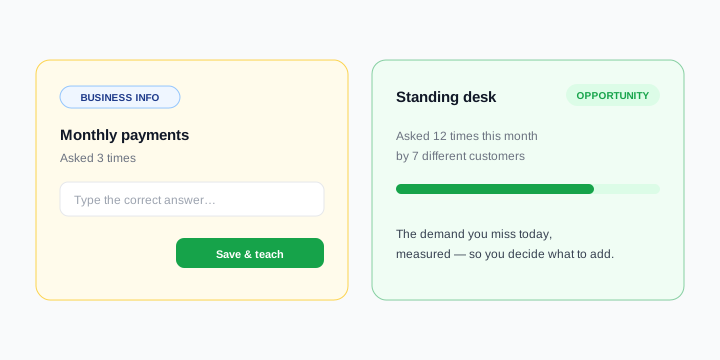
Information gaps: what it doesn’t know yet
When a customer asks something that isn’t in your catalog or your documents — say, "do you offer monthly installments?" — the agent doesn’t make things up. It honestly says it doesn’t have that detail yet and logs it as a gap in your dashboard.
There you write the correct answer ONCE and save it. From that moment on, the agent knows it forever and uses it with everyone. Each gap shows how many times it’s been asked, so you prioritize what people ask for most.
- The agent spots what it doesn’t know and logs it on its own — you never lose the question.
- You answer once from the dashboard; there’s nothing to retrain.
- You see how often each topic was asked, so you handle the important ones first.
Opportunities: the demand you’re missing
When someone asks for a product you don’t carry — "do you have height-adjustable standing desks?" — the agent helps politely and logs that interest as an opportunity. Over time you’ll see, measured, which products people want and you don’t have.
That’s real demand quietly lost today. With Vendilo it’s quantified: how many times it was requested and by how many different customers — the perfect basis for deciding what to add to your catalog.
What it’s for
- You improve your agent’s answers with no technical effort: every gap you close makes it more complete.
- You uncover catalog gaps with data, not hunches.
- You make buying and content decisions based on what your market actually asks for.
How to use it in Vendilo
There’s nothing to set up: both features work on their own as soon as your agent starts answering. Just drop into your dashboard now and then, resolve pending gaps (answer and save) and check the opportunities board to see what people are asking for. In minutes you turn your customers’ questions into a smarter agent and well-founded business decisions.
See it work in 2 minutes
Try the interactive demo: a real catalog answering over chat, no signup required.
Watch demoKeep reading
One AI agent, three channels: web, Telegram and WhatsApp
Un solo agente de IA puede atender chat web, Telegram y WhatsApp usando la misma base de conocimiento de tu negocio, sin duplicar trabajo. La clave está en entender cuándo conviene cada canal y cómo mantener una sola fuente de verdad para precios, stock y políticas.
How to measure your AI chatbot usage (and why it matters)
Learn how to measure your AI chatbot's usage—queries, channels, and agent activity—and turn those insights into more sales for your business.